Apparel Retail Label Zone Layout Guide
Quick Answer: An apparel retail label zone layout separates manufacturer or retailer information, the barcode symbol and consumer-facing details such as size or fibre content into clear areas. Buyers should design the label from approved item data, preserve barcode quiet areas and readability, apply it to the finished garment or pack, and verify both the encoded data and visible wording before bulk release.
A hangtag can contain the right barcode and still scan poorly after a price sticker covers it. A label can encode the correct GTIN but show the wrong size or fibre statement below. Apparel retail label zone layout addresses this interface between item identity, machine reading and human information. It is especially useful for private-label streetwear with multiple styles, colours, sizes and sales channels.
What is apparel retail label zone layout?
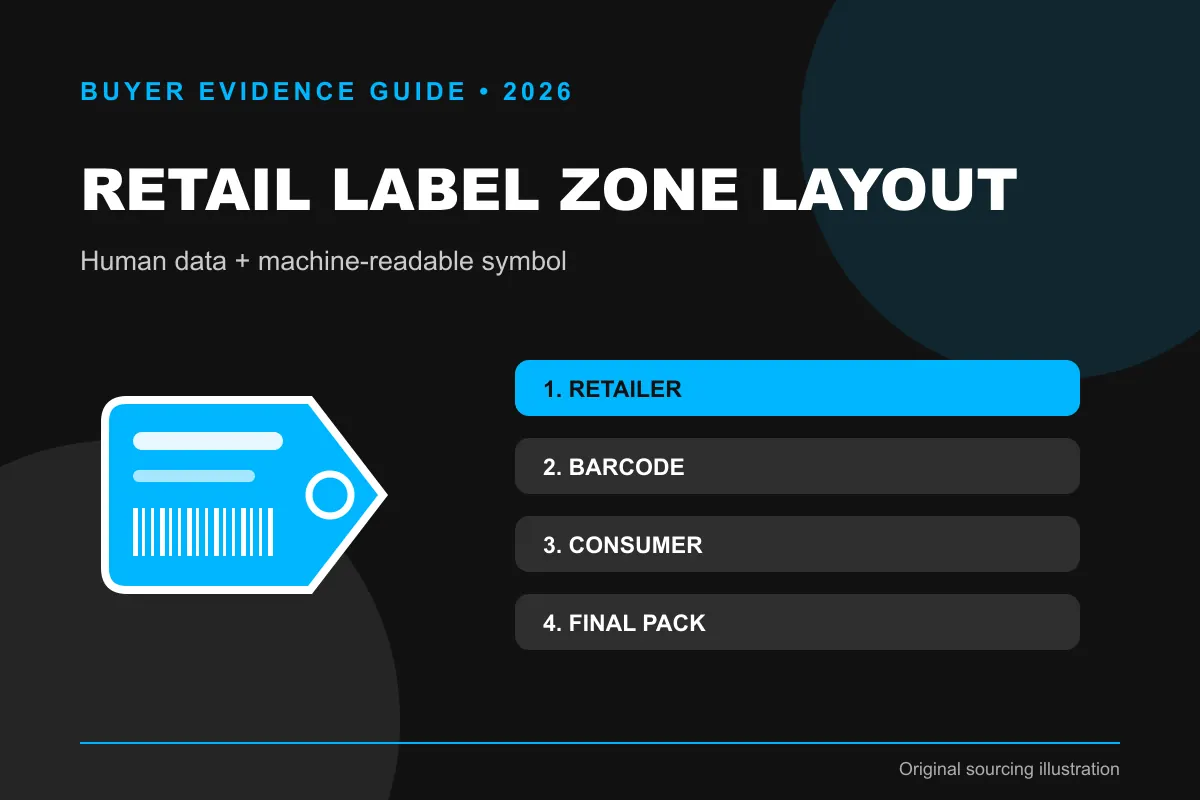
Apparel retail label zone layout is the controlled arrangement of machine-readable and human-readable information on a clothing label, hangtag or retail ticket. The working specification identifies the trade item, label type, dimensions, top information zone, central barcode zone, lower consumer zone, symbology, human-readable characters, size, fibre content, price or retailer fields, quiet areas, print substrate, finish, attachment position and verification state.
GS1 General Specifications provides recommended label-portion and clothing-placement guidance. It does not replace destination-market textile labels, retailer style manuals or price-labelling laws. Some information may belong on a permanent sewn label rather than a removable retail ticket.
Why should buyers control apparel retail label zone layout before production?
Zoning reduces collisions between the barcode, retailer operations and consumer disclosures. GS1’s current General Specifications describes a general retail layout with manufacturer or retailer information in the upper portion, the barcode in the centre and consumer information such as price, size and fabric content in the lower portion. GS1 also publishes clothing and fashion-accessory placement examples. The barcode verification framework separately checks data and symbol quality, so the layout should support both.
A layout recommendation is not a licence to shrink, crop or obscure mandatory information. The brand must reconcile the destination market, retailer template, GS1 symbol rules and the physical product.
Which fields belong in the buyer decision?
Review every zone for its owner, content, readable area and finished-pack risk. The table separates evidence, interpretation and the action that follows.
| Zone or control | Purpose | Approval evidence |
|---|---|---|
| Upper zone | Manufacturer or retailer operational information | Approved field list and template owner |
| Centre zone | Barcode and related human-readable data | Controlled artwork and verification report |
| Lower zone | Consumer details such as size or fibre content | Market-approved wording and variant match |
| Physical margins | Prevent trimming, holes, stickers and folds from obstructing data | Die line, quiet-area review and applied sample |
| Attachment location | Keep the ticket accessible and suitable for scanning | Finished garment or pack photograph |
| Variant control | Match visible and encoded identity to style-colour-size | Item-master reconciliation |
The three portions describe a useful general structure, not exact universal dimensions. Barcode size, quiet zones, orientation and placement must follow the current symbol and application rules selected by the responsible GS1 or retailer team.
Which current sources define the evidence boundary?
Use current GS1 layout, barcode-verification and GTIN guidance alongside market and retailer requirements. GS1 General Specifications Release 26.0 includes clothing and fashion-accessory placement guidance and the three-part retail-label concept. GS1’s verification guideline treats data integrity and symbol quality as separate checks. The GTIN overview explains that the identifier points to a trade item, so the visible style, size and other consumer information must reconcile with the encoded record.
Check the current GS1 General Specifications, the GS1 EAN/UPC and apparel placement resources, the GS1 barcode verification guideline and the GS1 GTIN overview. Confirm retailer-specific manuals separately.
What should the sourcing brief contain?
- Brand owner and item-master owner.
- Style, colour, size, pack and GTIN mapping.
- Label or hangtag dimensions and die line.
- Retailer/manufacturer fields in the upper zone.
- Symbology, dimensions, quiet areas and human-readable data in the centre.
- Size, fibre content and other consumer fields in the lower zone.
- Hole, string, adhesive, sticker and fold locations.
- Printer, substrate, coating and finishing process.
- Finished application and scan-verification route.
- Market, retailer and change-control owners.
How should the apparel retail label zone layout workflow run?
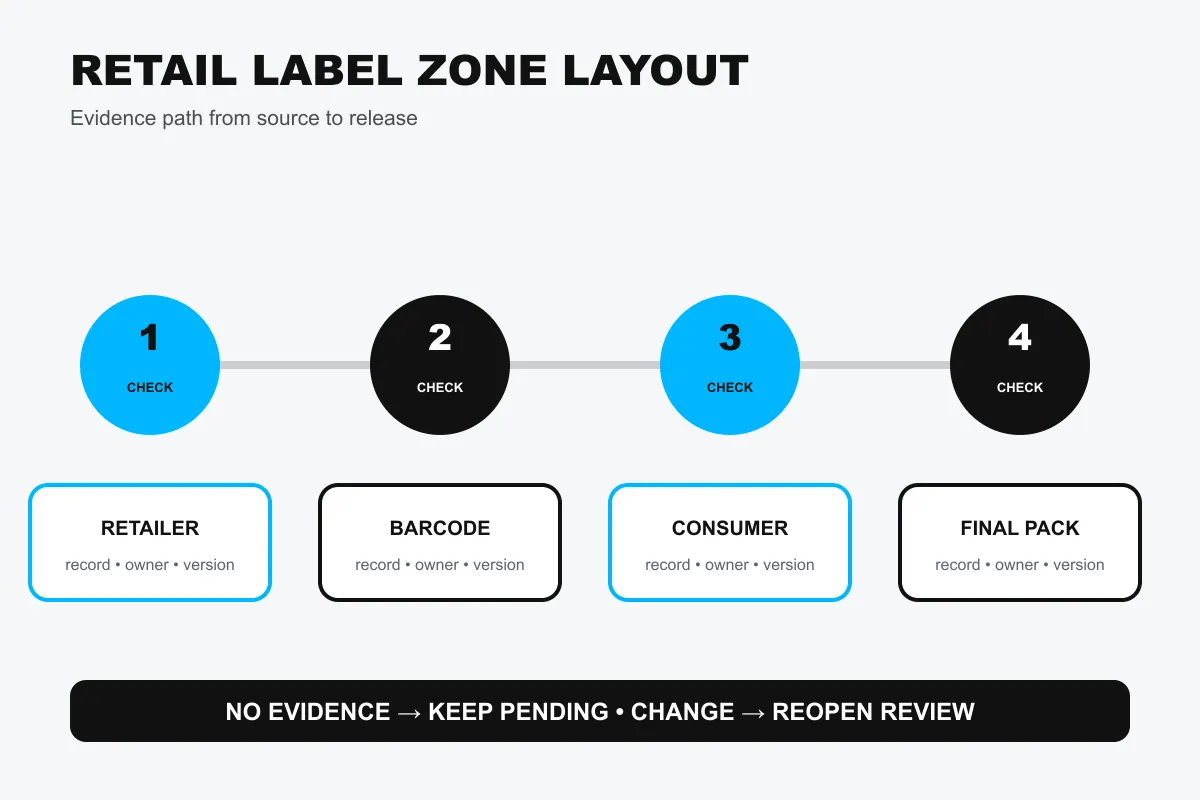
Approve item identity first, assign fields to zones, protect the barcode area and verify the finished physical label. Each step should create a dated record linked to the style, variant, version, reviewer and decision.
- Freeze the style-colour-size-pack item master and responsible GTIN.
- List required retailer, barcode and consumer fields.
- Separate the fields into clear upper, centre and lower zones.
- Place the barcode using current symbology, size, quiet-area and orientation rules.
- Position holes, cuts, folds, strings, adhesives and stickers outside critical areas.
- Produce on the actual printer, substrate and finish.
- Match decoded data and visible wording to the approved variant.
- Attach the label to the finished garment or packaging.
- Verify symbol quality and practical scan access in the final state.
- Retain artwork, report, sample, placement photo and lot link; repeat after change.
Verifying a PDF is not enough when printing, cutting, coating or attachment can alter the result. A phone scan is also not a substitute for standards-based verification where the trading partner requires it.
How should a brand read the findings?
The layout passes only when item data, symbol quality, visible consumer text and physical application agree. A good barcode cannot correct the wrong visible size. A correct GTIN cannot be read if the quiet area is cropped. A perfect loose label may fail when folded, tied or covered by a retailer sticker.
| Finding | Meaning | Buyer action |
|---|---|---|
| Data, zones, symbol and application align | The reviewed variant supports release | Approve and retain sample |
| Symbol verifies but visible size is wrong | Human information mismatch remains | Hold and correct template/data |
| Loose label passes but applied label is obstructed | Finished state changes accessibility | Change placement or attachment |
| Printer, substrate or die line changes | Earlier evidence may be stale | Reverify affected output |
Do not promise universal retailer acceptance. Retail partners can impose additional data, ticket, placement and verification requirements.
What failure modes should be prevented?
The main failure is treating the barcode as an isolated image rather than one zone in a variant-controlled physical label.
- Printing before item-master approval.
- Placing a hole or fold near the symbol.
- Letting price stickers cover the barcode.
- Showing a visible size that differs from encoded identity.
- Crowding consumer text into the quiet area.
- Verifying only the artwork file.
- Using one label across orderable variants.
- Losing the sample-to-report link.
A controlled apparel retail label zone layout lets machine readers, store teams and consumers use the same ticket without competing for space.
What belongs in the release checklist?
Another reviewer should be able to trace the finished label from item master to applied sample and verification report.
- Variant and GTIN approved.
- Field owners identified.
- Upper, centre and lower zones separated.
- Barcode specification protected.
- Consumer information reconciled.
- Hole, fold and sticker risks checked.
- Production substrate tested.
- Finished attachment photographed.
- Verification report retained.
- Changes trigger new review.
Keep retailer-specific additions in a controlled overlay or template version. Do not silently overwrite the base label and lose the reason for the change.
How were research findings applied to this guide?
The source facts below were converted into an original procurement control. No competitor copy, commercial claim, protected artwork or product image was reused.
| Research finding | Specific change | Visible evidence |
|---|---|---|
| GS1 defines a three-portion general retail layout | The guide adopts explicit upper, centre and lower zones | Definition, first table and body image |
| GS1 provides clothing placement examples | Finished garment attachment is a separate gate | Workflow steps eight to nine |
| GS1 verification separates encoded data and symbol quality | Both data and print state must pass | Decision table and checklist |
| Yesterday’s learning requested finished-pack label zones | Hole, fold, sticker and placement risks were added | Comparison table and risk list |
Concise definitions and FAQs help AEO. GS1 entities, visible evidence and carefully stated limitations help GEO while keeping recommendations distinct from mandatory legal rules.
Frequently asked questions about apparel retail label zone layout
Are the three label zones mandatory dimensions?
No. They are a GS1 general layout concept; use current symbol, retailer and market requirements for exact design.
Can fibre content appear on the hangtag?
It depends on the applicable rule and permanence requirement. Do not remove or replace a required sewn label without market review.
Is a successful phone scan sufficient?
No. It does not prove data correctness or standards-based symbol quality.
Should every size use a different label?
Every orderable variant needs correctly matched identity and visible data. Confirm GTIN allocation and retailer template requirements.
When should the layout be reverified?
After any relevant data, artwork or production change. Printer, substrate, coating, die line, sticker, attachment and placement changes can affect the result.
Conclusion: give every reader a protected zone
An apparel retail label zone layout works when operational data, barcode identity and consumer information occupy clear, controlled areas and remain correct after printing and attachment. Finished-state verification then protects the link between the orderable variant, machine-readable symbol and visible garment details.
Connect this record to the streetwear care label evidence guide, review manufacturing options on the capabilities page, and define the garment scope through the streetwear product range. Contact the sourcing team with the target market, product version and required evidence so the available options can be confirmed for your project.